

Play Store Application link – Advance java – in 15 steps – Apps on Google Play
Learn with our youtube video –
There are two ways of communication/collaboration between servlets.
| RequestDispatcher Interface | sendRedirect method |
|---|---|
| Forwards a request within the same application | Redirects a request to a different application or URL |
| Does not change the URL in the browser | Changes the URL in the browser. |
| Can use the forward and include methods | Uses the sendRedirect method on the HttpServletResponse object |
| Used for internal request forwarding | Used for external request redirection |
| request.getRequestDispatcher (“/servlet2”).forward(request,response); | response. sendRedirect(“https://www.example.com“); |
| request.getRequestDispatcher (“/servlet2”). include(request,response); | response.sendRedirect(“/servlet2”); |
1- Request Dispatcher Interface-
Definition-RequestDispatcher is used to dispatch request to any resources on the server.
Syntax- RequestDispatcher rs = request.getRequestDispatcher(“resource name”);
– Methods of RequestDispatcher
| Forward Method | Include Method |
|---|---|
| This method forwards a request from a servlet to another resource (servlet, JSP file, or HTML file) on the server. | This method includes the content of a resource (servlet, JSP page, HTML file) in the response. |
| Shared request and response objects, changes made to request/response are visible to both. The client can’t interact with forwarding servlet again. | Shared request and response objects, changes made to request/response are visible to both. Client can interact with included resource and calling servlet. |
| Example: RequestDispatcher rd = request.getRequestDispatcher(“/servlet1”); rd.forward(request, response); | Example: RequestDispatcher rd = request.getRequestDispatcher(“/servlet1”); rd.include(request, response); |
| Response ends, client can’t interact with forwarding servlet. | Client can interact with included resource and calling servlet. |
| One-way operation. | Two-way operation. |
| Included resource not executed. | Included resource is executed. |
(i)-forward method-
Example 2- Web app to create a servlet which sends request object to another servlet using forward method.
Output-
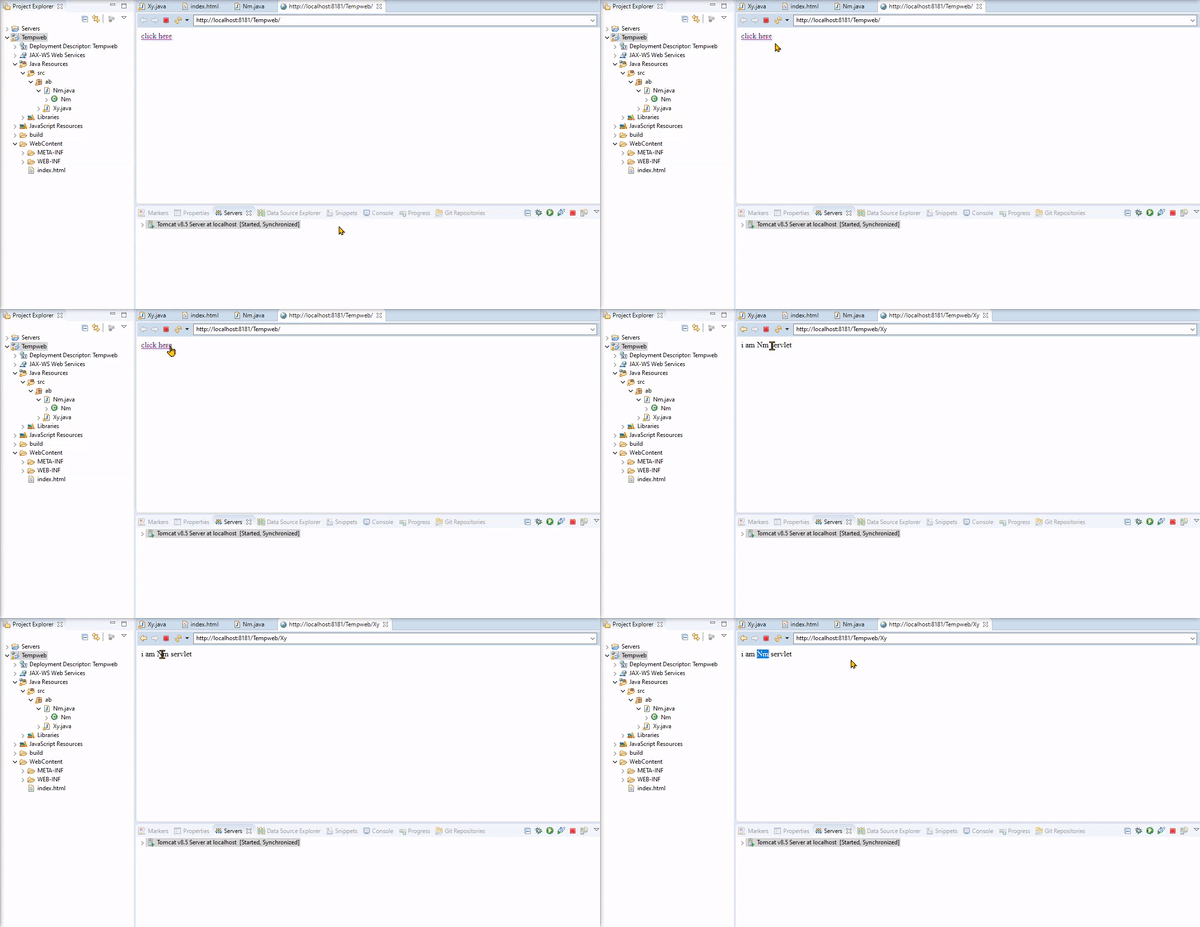
Project- 3 files-
1-Xy.java (inside package ‘abc’)
2-Nm.java(inside package ‘abc’)
3-index.html(inside WebContent folder)
1.Xy.java(servlet)
package ab;

import java.io.*;

import javax.servlet.*;
import javax.servlet.http.*;
@WebServlet("/Xy")
public class Xy extends HttpServlet {

protected void doGet(HttpServletRequest request, HttpServletResponse response) throws ServletException, IOException {
RequestDispatcher rd=request.getRequestDispatcher("Nm");
rd.forward(request, response);
}

protected void doPost(HttpServletRequest request, HttpServletResponse response) throws ServletException, IOException {
// TODO Auto-generated method stub
doGet(request, response);
}

}
2.Nm.java(servlet)
package ab;
import java.io.*;
import javax.servlet.*;
import javax.servlet.http.*;
@WebServlet("/Nm")
public class Nm extends HttpServlet {
protected void doGet(HttpServletRequest request, HttpServletResponse response) throws ServletException, IOException {
PrintWriter out=response.getWriter();
out.print("i am Nm servlet");
}
protected void doPost(HttpServletRequest request, HttpServletResponse response) throws ServletException, IOException {
doGet(request, response);
}
}
3.index.html
<html>
<body>
<a href=”Xy”>click here</a>
</body>
</html>
2-Include method-
Example 3- Web app to create a servlet which includes data of html page into a servlet using include method.
Output-
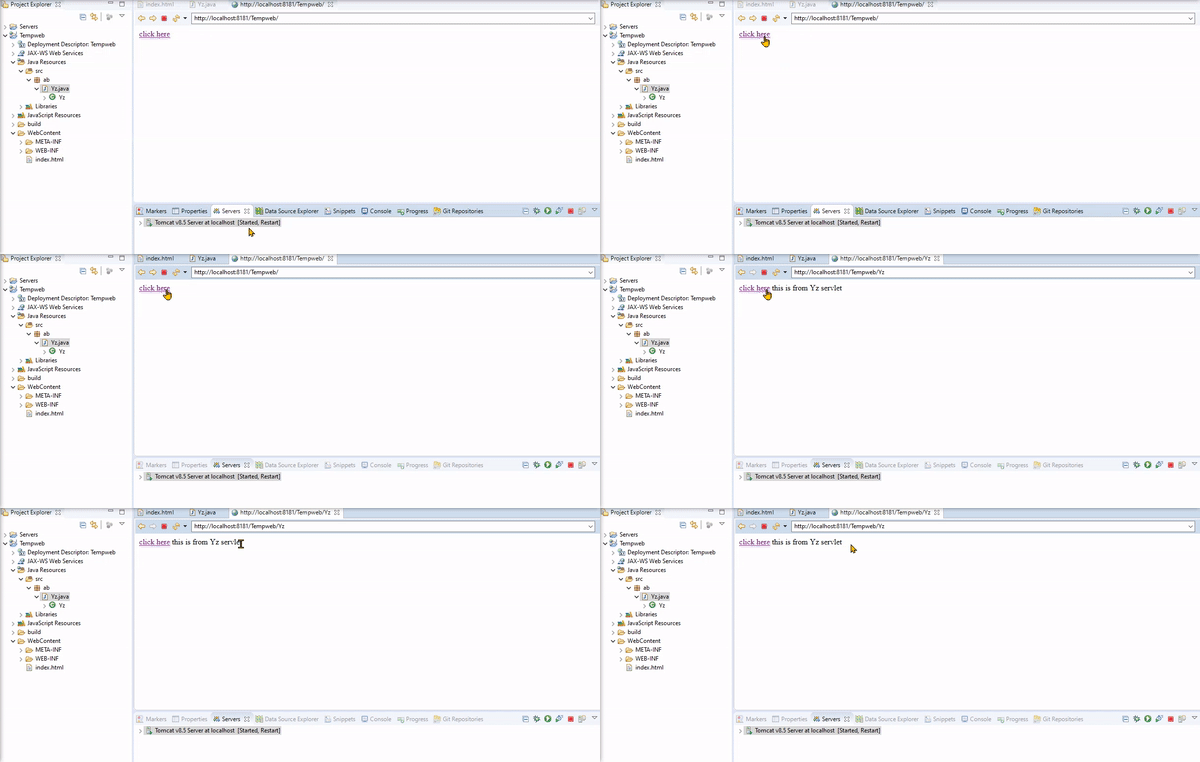
Project 2 files-
1-Yz.java (inside package ‘ab’)
2-index.html(inside WebContent folder)
1-Yz.java
package ab;
import java.io.*;
import javax.servlet.*;
import javax.servlet.http.*;
@WebServlet("/Yz")
public class Yz extends HttpServlet {
protected void doGet(HttpServletRequest request, HttpServletResponse response) throws ServletException, IOException {
PrintWriter out =response.getWriter();
RequestDispatcher rd=request.getRequestDispatcher("index.html");
rd.include(request, response);
out.print("this is from Yz servlet");
}
protected void doPost(HttpServletRequest request, HttpServletResponse response) throws ServletException, IOException {
doGet(request, response);
}
}
2-index.html
<html>
<body>
<a href=”Yz”>click here</a>
</body>
</html>
2-SendRedirect-
This method redirects the response to another resource.
Syntax– response.sendRedirect(“resource name”);
Example 4- Web app to create a servlet which executes another servlet using sendRedirect method.
Output-
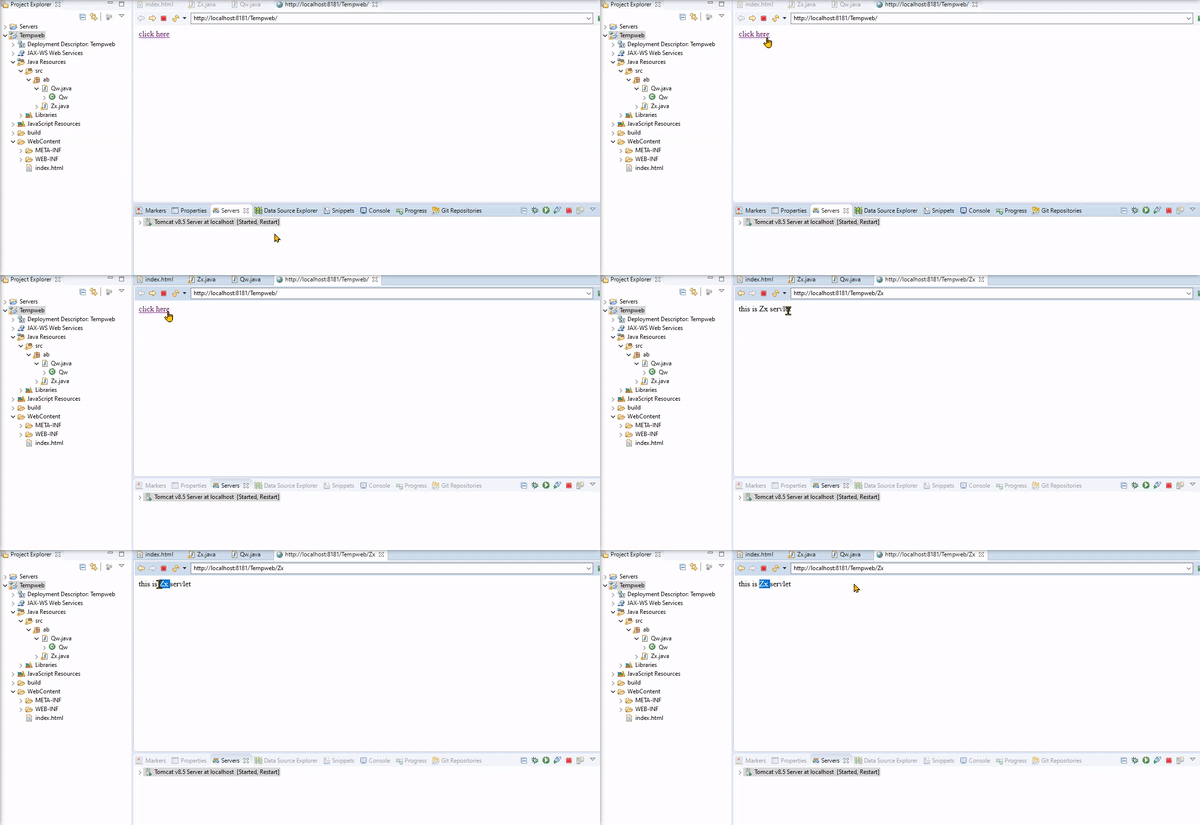
Project 3 files-
1-Qw.java (inside package ‘ab’)
2-Zx.java(inside package ‘ab’)
3-index.html(inside WebContent folder)
1.Qw.java(servlet)
package ab;
import java.io.IOException;
import javax.servlet.*;
import javax.servlet.http.*;
@WebServlet("/Qw")
public class Qw extends HttpServlet {
protected void doGet(HttpServletRequest request, HttpServletResponse response) throws ServletException, IOException {
response.sendRedirect("Zx");
}
protected void doPost(HttpServletRequest request, HttpServletResponse response) throws ServletException, IOException {
// TODO Auto-generated method stub
doGet(request, response);
}
}
2-Zx.java(servlet)
package ab;
import java.io.*;
import javax.servlet.*;
import javax.servlet.http.*;
@WebServlet("/Zx)
public class Zx extends HttpServlet {
protected void doGet(HttpServletRequest request, HttpServletResponse response) throws ServletException, IOException {
PrintWriter out = response.getWriter();
out.println("this is Zx servlet");
}
protected void doPost(HttpServletRequest request, HttpServletResponse response) throws ServletException, IOException {
doGet(request, response);
}
}
3-index.html
<html>
<body>
<a href=”Qw”>click here</a>
</body>
</html>